Stellar Blade Photo Mode Guide: How to Unlock It, Settings & Pro Tips
Matt Nursalim
6/11/20266 min read

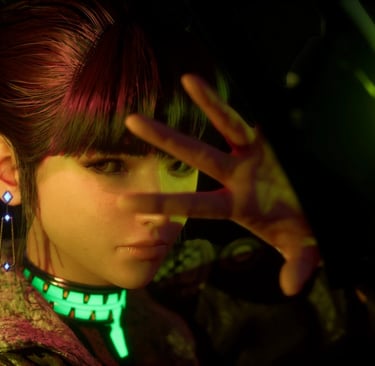
Stellar Blade's standard photo mode is available by default: open Settings > Photo Mode, or press R1 + Left during gameplay. The selfie camera unlocks separately through the Photography Club request on Xion's bulletin board. Both modes work on PS5 and PC, with a free camera, depth of field, and a full 3-point lighting rig. Below is the complete walkthrough, from unlock to lighting recipes, and it's worth reading to the end for the PC save bug that quietly eats photos from most new shooters.
TL;DR
The standard photo mode needs no unlock, R1 + Left opens it instantly
The Photography Club quest in Xion adds a selfie camera plus an outfit reward
Field of view runs 17 to 100 degrees, roughly a 15-120mm zoom equivalent
The 3-point lighting rig is the most underused tool in the entire mode
On PC, check that your Screenshots folder exists before you shoot, a known bug can stop photos from saving
How do you unlock photo mode in Stellar Blade?
You don't, at least not the main one. The full photo mode has shipped with the game since update 1.09 and is ready the moment you load in. Press R1 + Left on the D-pad during gameplay, or go the long way through Settings > Photo Mode > Enter Photo Mode. There's no way to assign full photo mode to a quicker shortcut, so get comfortable with that button combo.
The selfie camera is the one that needs unlocking. Here's the process:
Travel to Xion and find the Bulletin Board on the eastern side of the city, tucked into a narrow alley.
Accept the request titled Photography Club.
You'll receive an in-game camera in your tools menu. Hold down on the D-pad and select the camera icon to use it.
Complete the photo recreation task from the Data Bank's Photography Challenge section to earn the FourSeconds Everyday Wear outfit.
Five minutes of work, and you have both cameras in your kit.
Selfie camera vs full photo mode: which one to use
Use the full photo mode for almost everything. The selfie camera is a fun toy, but it locks the framing to Eve at arm's length, which kills most compositional options.
The difference comes down to freedom. The selfie camera stays fixed at arm's length and only ever frames Eve, with a basic set of adjustments. The full photo mode gives you a free camera you can move anywhere in the scene, lets you include Adam, Lily, enemies, and the environment in the frame, and unlocks the complete 3-point lighting rig. In practice, the selfie camera earns its place for quick outfit close-ups and casual shots around Xion. For landscape work, action freezes, or anything resembling deliberate photography, switch to the full mode.
The selfie camera earns its place for outfit close-ups and casual shots in Xion. For landscape work, action freezes, or anything resembling deliberate photography, switch to the full mode.
The settings that actually matter: FoV, depth of field and color
Three settings do most of the heavy lifting in this photo mode, and field of view is the first one to learn. The range runs from 17 to 100 degrees, which behaves like a 15-120mm zoom lens. Narrow values compress the background and isolate your subject. Wide values exaggerate scale, useful for boss encounters and the game's ruined cityscapes. For portraits of Eve, the sweet spot sits between 25 and 35 degrees, close enough to flatter without clipping the character model.
Depth of field is your subject isolation tool. Set the focus point on Eve's face, then widen the aperture effect until the background melts. The autofocus option tracks her face automatically, which saves real time when you're shooting moving subjects.
Color is where Stellar Blade's photo mode quietly outclasses most of its peers. Beyond basic saturation, the Hue control shifts the entire color temperature of the frame. Pulling it toward blue cools down the game's heavy orange palette and reads closer to cinema grading. The same cool-shift thinking drives a lot of my Cyberpunk 2077 night work, where neon needs a cold counterweight to pop.
You also get 26 poses and 18 expressions for Eve, most of which work for Adam and Lily too. And turn off the copyright watermark in the settings. The composition is yours; the frame should be too.
How the 3-point lighting system works
This is the feature almost nobody uses, and it's the fastest way to separate your shots from the flood of default-light captures online. The photo mode gives you three placeable light sources. Each one is omnidirectional, and each can be set to affect characters only, so you can light Eve without blowing out the scene behind her.
A basic recipe that works in most situations: place a key light front-left of your subject at moderate intensity, a dimmer fill light on the opposite side to soften the shadows, and a rim light behind the subject to cut a bright edge along the silhouette. That rim light is what makes a character pop off a dark background.
If you've practiced lighting in other photo modes, the skills transfer directly. The principles behind my Horizon Forbidden West captures apply here one for one, and Stellar Blade's character-only targeting actually makes the job easier than most games allow.
Capturing combat and action shots
Stellar Blade's combat animations are the best subjects in the game, and the trick is generating moments worth freezing. Eve's Beta and Burst abilities produce dynamic body positions and glowing visual effects that read beautifully in stills. Build energy before you reach a visually interesting arena, then spend it where the backdrop deserves it.
One limitation to know: photo mode is unavailable in the training room, which would otherwise be the obvious place to study animations. The training room does give you unlimited energy though, so use it to scout which ability animations you want, then hunt them in the field.
Freeze the action at the peak of motion, drop your FoV wide for scale or tight for intensity, and use the free camera to find the top-down and low angles that gameplay never shows you. Action timing is a craft of its own, and it's the same discipline behind my Ghost of Tsushima duel shots: anticipate the animation, don't chase it. You can see how this plays out in my growing Stellar Blade gallery, where most of the combat frames came from deliberately replayed encounters.
Photo mode on PC: saves, fixes and mods
The PC version includes the full photo mode, with controls rebindable in the settings menu. Two PC-specific things are worth knowing before your first session.
First, the save bug. Photos save to the Screenshots folder inside the game's install directory (Steam/steamapps/common/StellarBlade/Screenshots). If that folder doesn't exist, the game can fail to save photos without telling you. Create the folder manually, or disable HDR, which the developers have confirmed as a workaround.
Second, mods. Nexus Mods hosts a photo mode resolution toggle that bumps render quality for captures, cleans up hair artifacts, and adds extra depth of field options. There's also a mod that keeps the character model visible when the camera moves in close, fixing the vanishing-Eve problem on tight portraits. Hair rendering is the PC port's weakest point in stills, so these small mods meaningfully raise your ceiling.
Shift Up has kept patching the mode too. Recent updates added a control indicator for logo placement and fixed several photo mode crashes, so keep the game updated before a shooting session.
FAQ
Does Stellar Blade have a photo mode?
Yes. A full photo mode was added free in update 1.09 alongside the NieR: Automata collaboration, and it's included in the PC version. Older guides claiming the game has no photo mode predate that update.
What's the shortcut for photo mode?
R1 + Left on the D-pad. Full photo mode can't be assigned to a custom shortcut, so this combo is the fastest route in.
How do I remove the watermark from my photos?
Turn off the copyright print in the photo mode settings. It's on by default and sits at the bottom of every frame until you disable it.
Can you use photo mode in the training room?
No. The training room blocks photo mode entirely, but its unlimited energy makes it the best place to study ability animations before shooting them in the field.
Where do photos save on PC?
In the Screenshots folder inside the game's install directory. If the folder is missing, create it manually or disable HDR, otherwise photos can silently fail to save.
How many poses does Eve have?
26 poses and 18 expressions, and most of them also work for Adam and Lily.
Can you photograph Adam and Lily?
Yes. Full photo mode lets you choose which characters appear in the frame, including companions.
What did the latest updates change?
Recent patches added a control indicator when placing logos, fixed photo mode crashes, and ensured screenshots taken through the Odyssey 3D Hub save to the game's Screenshots folder.
Stellar Blade hands you a cinema-grade lighting rig and a 15-120mm lens for free. Most players never touch either, which means the ceiling for standout work is low to clear and high to reach. See how CapturedByAllister captures Stellar Blade and browse the full gallery.