Resident Evil Requiem Photo Mode: Horror Through a Lens
Matt Nursalim
7/1/20267 min read
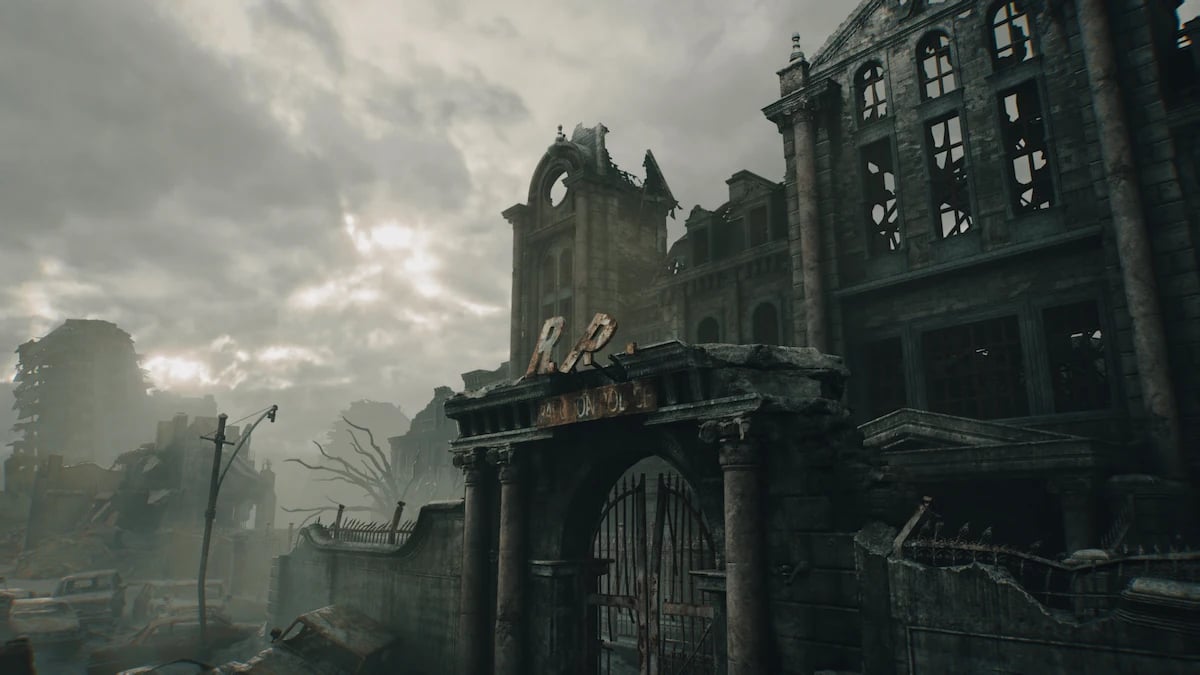
Resident Evil Requiem's photo mode was added in the March 27, 2026 patch. Access it by pressing Square on PS5, X on Xbox Series, or Escape then R on PC from the pause menu. The mode lets you adjust camera position, depth of field, filters, lens distortion, stickers, and character poses for both Grace and Leon, and is available on PS5, Xbox Series, Nintendo Switch 2, and PC.
Photo mode in an RE game is a different proposition than photo mode in most open-world titles. RE Requiem runs on Capcom's RE Engine, built with path-traced lighting on PC and ray tracing across all platforms, which means you are working with some of the most technically sophisticated in-game lighting available. That changes how you approach every shot. This guide covers what photo mode actually gives you, how RE Engine's lighting behavior shapes your compositional decisions, which characters and locations reward intentional framing, and what the mode can't do yet. If you're new to the discipline, the introduction to virtual photography is worth reading first.
TL;DR
Resident Evil Requiem's photo mode arrived March 27, 2026, via free patch on all platforms. Access: Square (PS5) / X (Xbox) / Escape+R (PC) from the pause menu. Controls include camera position, depth of field, filters, lens distortion, stickers, and character poses. Grace has 50, Leon has 42. The camera distance cap is the main limitation; PC players can remove it with NSA Cloud's Nexus mod. Best VP locations: RPD corridors, Wrenwood Hotel interior, Raccoon City street sections. RE Engine does not allow light source repositioning. Work with existing light, not against it.
What photo mode actually gives you in RE9
RE Engine is Capcom's proprietary rendering system, first deployed in Resident Evil 7. As with all Resident Evil games since RE7, Requiem was developed using the RE Engine, built with ray tracing in mind unlike the cross-generation Village. On PC, it features path-traced lighting, including ray-traced global illumination for multi-bounce indirect lighting. That engine behavior is what you're working with inside photo mode, and it shapes every decision you make.
The full photo mode control set covers camera position, focus, filters, stickers, and lens distortion. Depth of field (aperture and focal distance), exposure/brightness, color filters, vignette, and character expressions are all adjustable independently. You can change poses and expressions regardless of whatever animation was playing when you paused.
Grace has 50 poses and Leon has 42. The range runs from action-focused stances to frightened, reactive postures. Expression control is available for both characters.
How RE Engine's lighting changes what's possible
This is the constraint that no other guide on this topic addresses, and it matters.
RE Engine's lighting is high-contrast by design. The difference between a lit surface and an unlit one is steep, which is what makes the game's horror atmosphere work. In photo mode, that same steepness becomes a technical problem: the brightness slider lifts exposure across the entire frame. Push it far enough to pull detail out of a dark background, and the midground subject gets blown out before the background resolves.
The workaround is compositional rather than technical. Use depth of field to isolate your subject at the exposure level that reads correctly for them, and let the background fall further into shadow. Stop fighting the engine's contrast tendency. Work with it. A character in sharp focus against an indistinct dark background is not a failure of exposure. It's a horror photograph.
RE Engine does not give you a repositionable light source. If you're in the middle of a canned animation, you can't move the camera either, but you can still apply filters and tweak the lighting. What the engine gives you is what the game's lighting team placed, and your job is to find the angle where that existing light does something interesting.
The Death Stranding photo mode works with a similar directional light discipline, but the outdoor scale there changes the geometry entirely. Indoor RE Engine spaces are tighter, which makes the pre-pause moment more important than the post-pause adjustment. On PC, path tracing accurately simulates multi-bounce indirect lighting, which means surfaces that would be flat and dark in rasterized mode pick up reflected light from adjacent geometry. That's worth knowing before you reach for the brightness slider.
Grace and Leon as photographic subjects
The pose count gap is less important than what the poses actually do compositionally. Grace Ashcroft's 50 poses skew toward horror survival, reactive, and frightened postures, making her the stronger subject for atmosphere-first and environmental horror shots where the character reacts to the space around her. Leon S. Kennedy's 42 poses are action-focused, composed, and iconographic, better suited to portraiture and character-led frames where the subject anchors the environment rather than responds to it. Both characters support independent expression control, which means pose and facial expression can be adjusted separately regardless of which direction each is pushed compositionally.
Grace's larger set and horror-specific range make her the stronger subject when the environment is doing most of the work. Her reactive poses read as belonging to the space. Leon's poses lean toward control and composure, useful when you want the character to stand against the horror rather than inside it, which is a different kind of shot entirely.
Senua's Saga: Hellblade II presented a version of this same problem: a single protagonist whose expression set was the primary VP tool in an otherwise constrained environment. When a game limits your camera freedom, the character's face becomes the composition.
The best locations in RE Requiem for virtual photography
Location selection matters more in RE Requiem than in open-world VP games because the camera distance cap limits how wide you can go. You're working in closer quarters, so the environment's inherent detail has to carry the shot.
Raccoon Police Department (RPD) is the most photogenic space in the game. The corridor architecture creates natural leading lines, and the emergency lighting produces silhouette conditions without any filter adjustment. Practical fixtures cast hard shadows at low angles, and the geometry does the work. You can pause mid-walk and have a frame without staging anything.
Wrenwood Hotel rewards patience. The decay is layered: peeling surfaces over structural detail over background depth, which means a shallower depth of field picks up information at multiple distances when you find the right focal plane. The hotel register area, now known in the community for the lore it revealed when players zoomed in, is compositionally strong. Warm lighting against dark wood, readable surface detail, and a horizontal plane that anchors a three-quarter character shot.
Clinical areas (Care Center) are high-contrast environments by design. Clinical whites against biological horror elements produce color tension that works in both saturated and desaturated filter treatments.
Raccoon City streets are where environmental scale opens up. The volumetric fog in the outdoor sections diffuses the hard-edge lighting somewhat, which makes wider compositions possible that the interior spaces can't support.
For comparison points in location-based horror VP, the The Last of Us Part II gallery handles similar survival environments, and A Plague Tale: Requiem manages darkness and foreground detail in confined historical spaces. The Alan Wake II gallery is worth referencing for horror atmosphere that similarly depends on practical light sources rather than ambient fill.
What photo mode can't do — and the PC fix
The camera distance cap is the main limitation. The amount you can move the camera away from the characters is limited, which is a problem when you're trying to frame a wide atmospheric shot with the background doing the heavy lifting. It rules out certain wide environmental compositions and makes it difficult to place characters as small figures within a larger frame.
During cutscenes, if you're in the middle of a canned animation, you can't move the camera, but you can still apply filters and tweak the lighting. Two specific scenes retain the full camera lock: the FBI office cutscene at the start of the game and the cutscene where Leon drives to Raccoon City.
On PC, NSA Cloud's Remove Photo Mode Limitations mod removes the camera distance cap, terrain clipping, and rotation lock, and enables camera movement in most cutscenes. It requires REFramework (latest nightly build). Installation:
Install REFramework — drop dinput8.dll from the RE9 zip into the game's root directory.
Create a pak_mods folder in that same root directory.
Drop RemovePhotoModeLimitations.pak into that folder.
Launch the game. The mod activates without further configuration.
Console players have no equivalent option. The distance cap is a real compositional constraint on PS5 and Xbox — worth designing around rather than trying to ignore. The Cyberpunk 2077 photo mode has a comparable PC modding ecosystem if you want to see what an unlocked workflow looks like in another dark, atmospheric title.
Frequently asked questions
How do you access photo mode in Resident Evil Requiem?
Press Square on PS5, X on Xbox Series, or Escape then R on PC from the pause menu. Photo mode was added in the March 27, 2026 patch and works on PS5, Xbox Series, Nintendo Switch 2, and PC.
Did Resident Evil Requiem launch with photo mode?
No. Resident Evil Requiem launched on February 27, 2026, without photo mode. Capcom added it one month later with the March 27, 2026 patch.
Can you use photo mode during cutscenes in RE Requiem?
Partially. Filters and lighting adjustments work across all cutscenes. Camera movement is blocked during non-playable sequences — specifically the FBI office opening and the Leon driving scene. PC players can remove this restriction with the Remove Photo Mode Limitations mod from Nexus Mods.
How many poses does RE Requiem photo mode have?
Grace Ashcroft has 50 poses and Leon S. Kennedy has 42, ranging from action stances to horror-survival and frightened postures. Expression control is separate from pose selection for both characters.
Does RE Requiem photo mode work on Nintendo Switch 2?
Yes. The March 27, 2026 patch deployed photo mode simultaneously across all platforms, including Nintendo Switch 2.
How does RE9 photo mode compare to RE Village?
RE Requiem adds character poses (Grace: 50, Leon: 42) and stickers not present in Village's implementation. The RE Engine already supported ray tracing since Village, which featured ray-traced global illumination, ambient occlusion, and reflections. Requiem builds on that base with path tracing on PC. The Resident Evil Village gallery and Resident Evil 4 gallery show how the same engine reads across different visual contexts in the series.
How do you remove photo mode limitations in RE9 on PC?
Install NSA Cloud's Remove Photo Mode Limitations mod via Nexus Mods. It requires REFramework (latest nightly build). Drop the .pak file into a pak_mods folder in the game's root directory. The mod removes the distance cap, unlocks rotation, and enables camera movement in most cutscenes.
What are the best locations in RE Requiem for virtual photography?
The RPD corridors, Wrenwood Hotel interior, and Raccoon City outdoor sections offer the most compositional range. The RPD's emergency lighting produces hard silhouette conditions without filter adjustment. The Wrenwood rewards shallow depth of field across layered decay surfaces.
Where can I share Resident Evil Requiem virtual photography?
The VP community posts under #REBHFun and #VirtualPhotography on Twitter/X and Threads. Picashot had indexed 214 RE Requiem captures as of late March 2026 and is searchable by game title.